Collab Services: 11 Scientific Computing Tools Join openDesk Edu
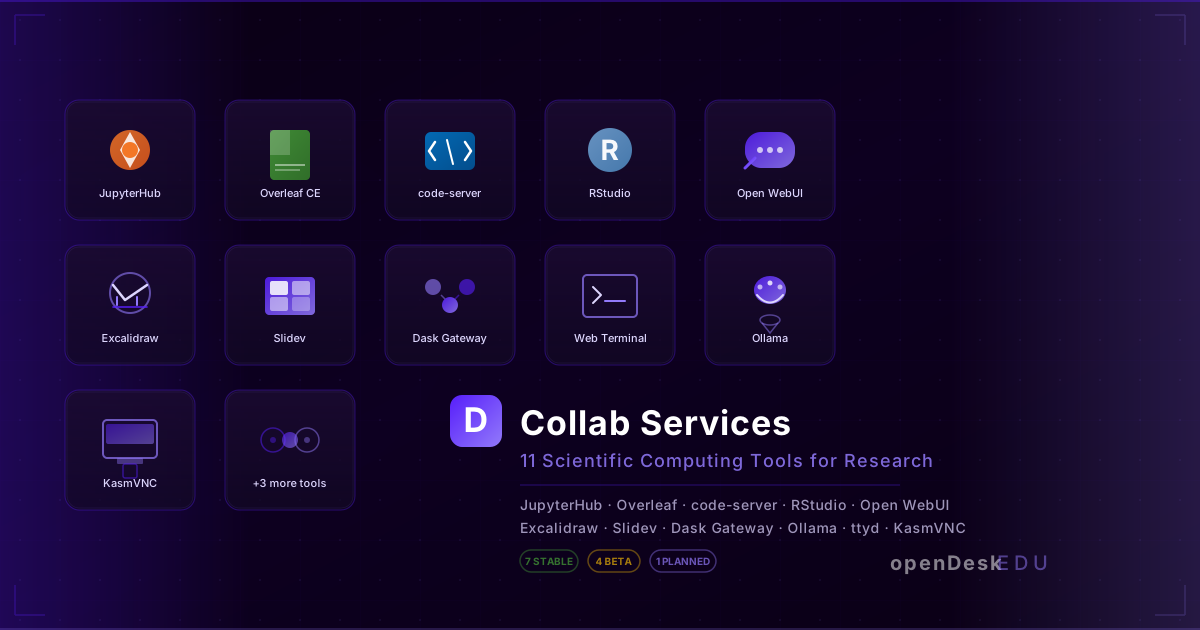
openDesk Edu has landed its largest feature update yet. Collab Services — Phase A of a three-phase initiative — adds 11 open-source scientific computing tools to the platform, transforming it from a productivity-and-LMS system into a full digital research environment for universities and research institutions.
The new tools cover interactive notebooks, collaborative LaTeX, browser-based IDEs, local AI assistants, distributed computing, and more. All are deployed via Helmfile on Kubernetes, integrated with Keycloak single sign-on, and share Let's Encrypt TLS through HAProxy ingress.
What's Being Added
| Category | Tool | Function | Status | Subdomain |
|---|---|---|---|---|
| Computing | JupyterHub | Multi-user notebooks (Python, R, Julia, SageMath, Octave) | ✅ Stable | jupyter.* |
| code-server | VS Code in the browser | ✅ Stable | code.* |
|
| RStudio Server | R IDE with Shiny app support | 🟡 Beta | r.* |
|
| Dask Gateway | Distributed parallel computing clusters | 🔵 Planned | compute.* |
|
| Editing | Overleaf CE | Collaborative real-time LaTeX | ✅ Stable | latex.* |
| Slidev | Markdown-to-presentations | 🟡 Beta | slides.* |
|
| AI | Open WebUI | ChatGPT-like interface for local LLMs | 🟡 Beta | ai.* |
| Ollama | Local LLM backend (llama3.2, nomic-embed-text) | 🟡 Beta | — | |
| Visualization | Excalidraw | Collaborative whiteboard | ✅ Stable | — |
| Infrastructure | ttyd | Browser-based Linux terminal | ✅ Stable | term.* |
| KasmVNC | Full Linux desktop in the browser | 🟡 Beta | desktop.* |
Each service gets its own subdomain under the institution's wildcard DNS — jupyter.example.edu, r.example.edu, latex.example.edu, and so on — routed through HAProxy ingress with automatic Let's Encrypt TLS certificates.
Why This Matters
openDesk Edu already provided learning management (ILIAS, Moodle), video conferencing (BigBlueButton, Jitsi), file sync (Nextcloud, OpenCloud), and productivity tools (Collabora, XWiki, OpenProject). What was missing was the interactive computing infrastructure that platforms like CoCalc offer to universities.
Collab Services closes that gap. Students and researchers can now:
- Run Jupyter notebooks with Python, R, Julia, SageMath, and GNU Octave kernels
- Write collaborative LaTeX documents in real time with Overleaf CE
- Develop R scripts and Shiny applications in a dedicated IDE
- Code in VS Code from any device with no local installation
- Chat with private LLMs through Open WebUI, powered by Ollama
- Access a full Linux terminal or desktop environment from a browser
- Create presentations from Markdown with Slidev
- Submit distributed computing jobs to a Dask Gateway cluster
All without leaving the openDesk Edu ecosystem and without provisioning any additional infrastructure.
Architecture
The deployment follows openDesk Edu's established conventions. All tools live in helmfile/apps/ as a new app group alongside the existing education and productivity services.
Repository Structure
opendesk-edu/
├── helmfile/apps/
│   ├── jupyterhub/          # Upstream chart (hub.jupyter.org)
│   ├── overleaf/            # Upstream chart (ghcr.io/sharelatex)
│   ├── open-webui/          # Upstream chart (helm.openwebui.com)
│   ├── ollama/              # Upstream chart (ollama.github.io)
│   ├── code-server/         # Upstream chart (helm.coder.com)
│   ├── kasmvnc/             # Upstream chart (registry.kasmweb.com)
│   ├── dask/                # Upstream chart (helm.dask.org)
│   ├── rstudio/             # Custom local chart
│   ├── ttyd/                # Custom local chart
│   ├── slidev/              # Custom local chart
│   └── collab-dashboard/    # Custom local chart + React SPA
├── helmfile/charts/
│   ├── rstudio/             # Deployment + Service + Ingress + PVC
│   ├── ttyd/                # Deployment + Service + Ingress
│   ├── slidev/              # Init container + nginx + PVC
│   ├── collab-dashboard/    # nginx serving React SPA
│   └── opencloud-sidecar/   # rclone-based file sync sidecar
└── collab-dashboard/        # React app source (Vite + TypeScript + Tailwind)
    ├── src/
    │   ├── data/tools.ts    # Feature catalog data model
    │   ├── components/
    │   │   ├── CardGrid.tsx
    │   │   └── ToolCard.tsx
    │   └── pages/Home.tsx
    ├── package.json
    ├── vite.config.ts
    └── Dockerfile
Seven tools use upstream Helm charts directly. Four tools required custom charts because no production-quality Helm charts existed:
| Custom Chart | Image | Port | Storage | Auth |
|---|---|---|---|---|
rstudio |
rocker/rstudio:4.4.2 |
8787 | 10Gi PVC | oauth2-proxy |
ttyd |
tsl0922/ttyd:1.7.7 |
7681 | — | oauth2-proxy |
slidev |
ghcr.io/slidevjs/slidev:0.49.0 → nginx:alpine |
80 | 1Gi PVC | oauth2-proxy |
collab-dashboard |
weissto/collab-dashboard (custom build) |
80 | — | oauth2-proxy |
Deployment Order
The helmfile groups releases by stage to respect dependency chains:
| Stage | Releases |
|---|---|
010-infra |
ollama (LLM backend — must be running before Open WebUI) |
050-components |
jupyterhub, overleaf, open-webui, rstudio, code-server, ttyd, kasmvnc, dask, slidev |
060-frontend |
collab-dashboard (depends on services being available) |
Single Sign-On Architecture
All services authenticate through Keycloak using one of two patterns:
Pattern 1: oauth2-proxy sidecar — A reverse proxy sidecar injected into the same pod as RStudio, ttyd, Slidev, code-server, and the Collab Dashboard. The sidecar intercepts all incoming HTTP traffic on port 4180, redirects unauthenticated users to Keycloak's OIDC endpoint, and proxies authenticated requests to the application container on its local port.
Pattern 2: Native OIDC — JupyterHub uses OAuthenticator with the GenericOAuthenticator class, and Open WebUI has built-in OIDC support. Both point directly at Keycloak's standard OIDC endpoints (/realms/opendesk/protocol/openid-connect/...).
In the production environment, Keycloak is configured with an Identity Provider Redirector that auto-forwards to Shibboleth SAML. The result is a seamless authentication chain:
User → Service (e.g. RStudio)
  → oauth2-proxy redirects to Keycloak
    → Keycloak auto-redirects to Shibboleth SAML
      → University login (weblogin.example.edu)
        → SAML assertion → Keycloak OIDC token
          → Authenticated access to RStudio
Users authenticate once with their university credentials and gain access to all 11 tools without re-authentication.
OpenCloud Storage Integration
RStudio also received an OpenCloud WebDAV sidecar. The sidecar uses rclone to mount the user's OpenCloud files into the RStudio workspace, giving R users direct access to their file sync storage from within the IDE:
opencloud:
  enabled: true
  url: "https://opencloud.example.com"
  username: "demo"
  password: "demo"
  syncInterval: "60s"
The same opencloud-sidecar pattern is planned for code-server and ttyd.
The Collab Dashboard
A custom React SPA — built with Vite, TypeScript, and Tailwind CSS — sits at collab.* and serves as a feature catalog. It maps each CoCalc feature to its open-source Kubernetes-native alternative:
export const tools: CollabTool[] = [
  {
    id: 'jupyterhub',
    name: 'JupyterHub',
    description: 'Multi-user notebooks with kernels for Python, R, Julia, SageMath, and Octave.',
    coCalcFeature: '↔ Jupyter Notebooks',
    category: 'computing',
    status: 'stable',
  },
  {
    id: 'overleaf',
    name: 'Overleaf CE',
    coCalcFeature: '↔ Collaborative LaTeX',
    category: 'editing',
    status: 'stable',
  },
  // ... 9 more tools
];
The dashboard is served by an nginx container and protected behind the same oauth2-proxy sidecar, ensuring only authenticated users can browse the service catalog.
How to Deploy
Collab Services is part of the main branch on Codeberg. Deploy alongside the rest of openDesk Edu with Helmfile selectors:
# Deploy a single tool
helmfile -e prod apply --selector name=rstudio

# Deploy the LLM backend first, then the AI interface
helmfile -e prod apply --selector name=ollama
helmfile -e prod apply --selector name=open-webui

# Deploy everything at once
helmfile -e prod apply
For standalone deployments outside the Helmfile orchestration, each custom chart supports direct Helm installs:
helm upgrade --install rstudio ./helmfile/charts/rstudio \
  --namespace opendesk-edu \
  --set ingress.hosts[0].host=r.${DOMAIN} \
  --set oauth2.enabled=true \
  --set oauth2.clientSecret=${CLIENT_SECRET} \
  --set oauth2.cookieSecret=$(openssl rand -hex 16) \
  --set oauth2.oidcIssuerUrl=https://id.${DOMAIN}/realms/opendesk
For JupyterHub with native OIDC:
helm upgrade --install jupyterhub jupyterhub/jupyterhub \
  --namespace opendesk-edu \
  --set ingress.enabled=true \
  --set ingress.hosts[0]=jupyter.${DOMAIN} \
  --set hub.config.GenericOAuthenticator.client_id=opendesk-jupyterhub \
  --set hub.config.GenericOAuthenticator.client_secret=${JH_CLIENT_SECRET} \
  --set hub.config.GenericOAuthenticator.oauth_callback_url=https://jupyter.${DOMAIN}/hub/oauth_callback \
  --set hub.config.GenericOAuthenticator.authorize_url=https://id.${DOMAIN}/realms/opendesk/protocol/openid-connect/auth
Keycloak OIDC clients must be created for each service before enabling authentication. See the OAuth2-proxy configuration guide for details.
Verification
A smoke test script (scripts/smoke-test.sh) verifies all services respond correctly. Actual results from the production cluster on 28 May 2026:
=== Collab Services Smoke Test ===
Domain: opendesk-edu.org | Ingress: 192.168.3.201

  ✅ RStudio (r) → HTTP 302
  ✅ ttyd (term) → HTTP 302
  ✅ Dashboard (collab) → HTTP 302
  ✅ Slidev (slides) → HTTP 200
  ✅ Open WebUI (ai) → HTTP 200
  ✅ JupyterHub (jupyter) → HTTP 302
  ✅ code-server (code) → HTTP 302

  Plus existing services:
  ✅ ILIAS (lms) → HTTP 200
  ✅ Moodle (moodle) → HTTP 200

✅ Smoke test complete — all 9 services operational
All five custom charts additionally pass dedicated Helm test connectivity checks using nc -z (TCP port probing):
$ helm test rstudio -n opendesk-edu          → ✅ Succeeded
$ helm test ttyd -n opendesk-edu             → ✅ Succeeded
$ helm test slidev -n opendesk-edu           → ✅ Succeeded
$ helm test collab-dashboard -n opendesk-edu → ✅ Succeeded
$ helm test code-server -n opendesk-edu      → ✅ Succeeded
What's Next: Phase B and Phase C
Collab Services is planned in three phases. Phase A (Foundation) is complete. Two more phases are on the roadmap.
Phase B — Core Tools Refinement
- Full JupyterHub profiles for SageMath, Octave, and Julia kernels via singleuser image profiles
- Overleaf CE with persistent storage and real-time collaboration tuning
- Deeper Open WebUI + Ollama integration with model management via the Ollama API
- Production values tuning based on pilot user feedback
Phase C — Remaining Tools and Polish
- KasmVNC and Dask with full production-ready configuration
- Portal tiles in the Nubus navigation for all 11 services
- Feature detail pages in the React dashboard (per-tool routes with documentation)
- OpenCloud sidecar rollout to code-server and ttyd
- Resource quota recommendations for each tool
Getting Involved
Collab Services is open-source (Apache 2.0) and part of the opendesk-edu/opendesk-edu repository on Codeberg. The repository is bidirectionally mirrored to GitHub.
Useful links:
- Deployment guide — step-by-step instructions for each tool
- Design spec — full architecture and CoCalc feature map
- OAuth2-proxy config — Keycloak client setup for each service
- Implementation plan — detailed task breakdown for Phase A
Deploy today:
git clone https://codeberg.org/opendesk-edu/opendesk-edu.git
cd opendesk-edu
helmfile -e prod apply --selector name=jupyterhub
Questions, bug reports, and contributions are welcome via Codeberg Issues or the Matrix channel.
openDesk Edu is an open-source digital workplace platform for higher education. It extends openDesk Community Edition with learning management, video conferencing, file sync, and now scientific computing tools — all on Kubernetes with unified single sign-on. Licensed under Apache 2.0.
This project is developed as part of a university's digital sovereignty strategy.